> ## Documentation Index
> Fetch the complete documentation index at: https://laminarai-docs-lam-1778-self-host-access-control.mintlify.site/llms.txt
> Use this file to discover all available pages before exploring further.
# Observability for Temporal Workflows
## Overview
Laminar is an open-source, OpenTelemetry-native observability platform for [Temporal](https://temporal.io) workflows. Trace, debug, and monitor a workflow run as a single trace, even though its client, workflow, and activities run in separate processes. Self-host via Helm or use managed cloud.
Temporal splits an application across processes: a client starts workflows, a worker runs the workflow functions and their activities, and workflows can fan out to activities, child workflows, signals, and updates. Laminar propagates trace context through Temporal headers, so the client-side workflow call, the worker-side workflow, and every activity it schedules land under one trace instead of scattering into disconnected spans. In Python this is fully automatic; in TypeScript you register a set of interceptors.
What Laminar captures:
* A client-side span for each workflow's lifecycle (start to result, cancel, or terminate).
* A span per activity execution on the worker, named after the activity type, with arguments and return value.
* Any LLM calls, tool calls, or manual spans inside an activity, nested under that activity.
* Trace context forwarded to activities, child workflows, and `continueAsNew` scheduled from inside a workflow.
## How the wiring fits together
Temporal runs the client and worker as separate entry points. How much you wire up depends on the language.
You initialize Laminar and register interceptors in each process:
* **Client process**: initialize Laminar with the `@temporalio/client` module so workflow runs are wrapped in a span, then register the workflow, activity, and schedule client interceptors. These inject the active trace context into Temporal headers.
* **Worker process**: initialize Laminar with `disableBatch: true`, register the activity interceptor (reads the headers and wraps each activity in a span), and register the workflow interceptor module (forwards the trace context from a running workflow to anything it schedules).
The workflow interceptor is special: Temporal compiles workflow code into a deterministic V8 sandbox, so the interceptor has to be a standalone module that Temporal bundles separately. You register it by path, not by passing an instance.
There is nothing to wire up. `Laminar.initialize()` auto-instruments Temporal whenever `temporalio` is importable: it patches `Client` construction to inject a single interceptor that covers the client, activity, and workflow paths. The Temporal worker inherits client interceptors automatically, so initializing Laminar in each process is all you need. Call `Laminar.initialize()` once in the client entry point and once in the worker entry point, construct the `Client` as usual, and the workflow run, its activities, and any LLM calls inside them land under one trace.
## Getting started
Ensure you are using `@lmnr-ai/lmnr` version `0.8.28` or higher:
```bash theme={null}
npm install @lmnr-ai/lmnr@latest @temporalio/client @temporalio/worker @temporalio/workflow @temporalio/activity ai @ai-sdk/openai
# or
pnpm add @lmnr-ai/lmnr@latest @temporalio/client @temporalio/worker @temporalio/workflow @temporalio/activity ai @ai-sdk/openai
```
The `ai` and `@ai-sdk/openai` packages are only for the example activity below; swap them for whatever your activities actually call.
```bash theme={null}
export LMNR_PROJECT_API_KEY=your-laminar-project-api-key
```
The Laminar SDK ships a ready-made workflow interceptor entry point. Reference it by path with `require.resolve` so Temporal can bundle it into the workflow sandbox:
```typescript theme={null}
require.resolve('@lmnr-ai/lmnr/temporal-workflow-interceptors')
```
You pass this path in the worker setup below. If your worker uses a pre-built workflow bundle, or you prefer to keep the interceptor in your own repository, see [Keep the workflow interceptor in your own file](#keep-the-workflow-interceptor-in-your-own-file).
Initialize Laminar with `disableBatch: true`, register the activity interceptor factory, and register the workflow interceptor module by path:
```typescript worker.ts {2,5-7,14-19} theme={null}
import { Worker } from '@temporalio/worker';
import { Laminar, LaminarTemporalInterceptors } from '@lmnr-ai/lmnr';
import * as activities from './activities';
Laminar.initialize({
disableBatch: true,
});
async function run() {
const worker = await Worker.create({
workflowsPath: require.resolve('./workflows'),
activities,
taskQueue: 'summary-queue',
interceptors: {
activity: [LaminarTemporalInterceptors.ActivityInterceptorFactory()],
workflowModules: [
require.resolve('@lmnr-ai/lmnr/temporal-workflow-interceptors'),
],
},
});
await worker.run();
}
run().catch((err) => {
console.error(err);
process.exit(1);
});
```
Set `disableBatch: true` in the worker. The worker spawns short-lived activity executions, and with the default batching span processor the internal spans created inside an activity can be dropped before they are flushed.
Import the `@temporalio/client` module as a namespace and pass it to `Laminar.initialize` so each workflow run is wrapped in a span. Then register the workflow, activity, and schedule client interceptors:
```typescript client.ts {2-3,6-9,15-19,22,29,31} theme={null}
import { Connection, Client } from '@temporalio/client';
import * as client from '@temporalio/client';
import { Laminar, LaminarTemporalInterceptors, observe } from '@lmnr-ai/lmnr';
import { summaryWorkflow } from './workflows';
Laminar.initialize({
instrumentModules: { temporal: { client } },
disableBatch: true,
});
async function run() {
const connection = await Connection.connect();
const temporalClient = new Client({
connection,
interceptors: {
workflow: [new LaminarTemporalInterceptors.WorkflowClientInterceptor()],
activity: [new LaminarTemporalInterceptors.ActivityClientInterceptor()],
schedule: [new LaminarTemporalInterceptors.ScheduleClientInterceptor()],
},
});
await observe({ name: 'run-summary' }, async () => {
const result = await temporalClient.workflow.execute(summaryWorkflow, {
taskQueue: 'summary-queue',
workflowId: `summary-${Date.now()}`,
args: ['distributed tracing for Temporal workflows'],
});
console.log('Workflow result:', result);
});
await Laminar.shutdown();
await connection.close();
}
run().catch((err) => {
console.error(err);
process.exit(1);
});
```
Wrapping the `execute` call in `observe()` is optional but recommended: it creates a root span so the whole run is easy to find in the UI. Without it, the workflow lifecycle span becomes the root.
Pass the `@temporalio/client` module via `instrumentModules: { temporal: { client } }`. This is what lets Laminar wrap each workflow run (start to result) in a span, which is the parent that the worker-side workflow and activities nest under. The three client interceptors then inject that span's context into Temporal headers.
Activities run on the worker as ordinary functions, so any auto-instrumented SDK call or `observe()` span inside them is captured and nested under the activity span:
```typescript activities.ts {3,10-13} theme={null}
import { openai } from '@ai-sdk/openai';
import { generateText } from 'ai';
import { observe, getTracer } from '@lmnr-ai/lmnr';
export async function summarizeTopic(topic: string): Promise {
const { text } = await generateText({
model: openai('gpt-5-mini'),
system: 'You are a concise technical writer.',
prompt: `Write a two-sentence summary of: ${topic}`,
experimental_telemetry: {
isEnabled: true,
tracer: getTracer(),
},
});
return text;
}
export async function countWords(text: string): Promise {
return observe({ name: 'count_words', spanType: 'TOOL', input: { text } }, () =>
text.trim().split(/\s+/).filter(Boolean).length,
);
}
```
```typescript workflows.ts theme={null}
import { proxyActivities } from '@temporalio/workflow';
import type * as activities from './activities';
const { summarizeTopic, countWords } = proxyActivities({
startToCloseTimeout: '1 minute',
});
export async function summaryWorkflow(topic: string): Promise<{
summary: string;
wordCount: number;
}> {
const summary = await summarizeTopic(topic);
const wordCount = await countWords(summary);
return { summary, wordCount };
}
```
Do not call `observe()` or `Laminar.startSpan()` inside a workflow function. Workflow code runs in Temporal's deterministic V8 sandbox, where `crypto.randomUUID()` and real timestamps are unavailable, so span creation throws. Instrument inside activities (which run as normal Node functions) and on the client; the workflow interceptor handles context propagation for you.
Ensure you have `lmnr` version `0.7.53` or higher:
```bash theme={null}
pip install -U lmnr temporalio openai
```
The `openai` package is only for the example activity below; swap it for whatever your activities actually call.
```bash theme={null}
export LMNR_PROJECT_API_KEY=your-laminar-project-api-key
export OPENAI_API_KEY=your-openai-api-key
```
Call `Laminar.initialize()` before the worker connects. It auto-instruments Temporal when `temporalio` is importable: each activity execution is wrapped in a span, and any LLM call inside it nests underneath. Pass `disable_batch=True` so the short-lived spans created inside an activity are flushed before the activity execution exits.
```python worker.py {4,7} theme={null}
import asyncio
from temporalio.client import Client
from lmnr import Laminar
from temporalio.worker import Worker
Laminar.initialize(disable_batch=True)
import activities
from workflows import SummaryWorkflow
async def main():
client = await Client.connect("localhost:7233")
worker = Worker(
client,
task_queue="summary-queue",
workflows=[SummaryWorkflow],
activities=[activities.summarize_topic, activities.count_words],
)
await worker.run()
if __name__ == "__main__":
asyncio.run(main())
```
Set `disable_batch=True` in the worker. The worker spawns short-lived activity executions, and with the default batching span processor the internal spans created inside an activity can be dropped before they are flushed.
Initialize Laminar in the client process too, then start workflows as usual. Wrapping the call in a span is optional but recommended: it creates a root span so the whole run is easy to find.
```python client.py {4,6,14,23} theme={null}
import asyncio
from temporalio.client import Client
from lmnr import Laminar
Laminar.initialize()
from workflows import SummaryWorkflow
async def main():
client = await Client.connect("localhost:7233")
with Laminar.start_as_current_span(name="run-summary"):
result = await client.execute_workflow(
SummaryWorkflow.run,
"distributed tracing for Temporal workflows",
id=f"summary-{asyncio.get_event_loop().time()}",
task_queue="summary-queue",
)
print("Workflow result:", result)
Laminar.shutdown()
if __name__ == "__main__":
asyncio.run(main())
```
Activities run on the worker as ordinary functions, so any auto-instrumented SDK call or manual span inside them is captured and nested under the activity span. Mark a manual span with `span_type="TOOL"` (see [span types](/tracing/structure/span-types)) so it surfaces in the transcript view:
```python activities.py {3,22-24} theme={null}
from temporalio import activity
from openai import OpenAI
from lmnr import Laminar
openai = OpenAI()
@activity.defn
async def summarize_topic(topic: str) -> str:
response = openai.chat.completions.create(
model="gpt-5-mini",
messages=[
{"role": "system", "content": "You are a concise technical writer."},
{"role": "user", "content": f"Write a two-sentence summary of: {topic}"},
],
)
return response.choices[0].message.content or ""
@activity.defn
async def count_words(text: str) -> int:
with Laminar.start_as_current_span(
name="count_words", span_type="TOOL", input={"text": text}
):
return len([w for w in text.split() if w])
```
```python workflows.py theme={null}
from datetime import timedelta
from temporalio import workflow
with workflow.unsafe.imports_passed_through():
from activities import count_words, summarize_topic
@workflow.defn
class SummaryWorkflow:
@workflow.run
async def run(self, topic: str) -> dict:
summary = await workflow.execute_activity(
summarize_topic,
topic,
start_to_close_timeout=timedelta(minutes=1),
)
word_count = await workflow.execute_activity(
count_words,
summary,
start_to_close_timeout=timedelta(minutes=1),
)
return {"summary": summary, "word_count": word_count}
```
Do not call `observe()` or `Laminar.start_span()` inside a workflow function. Workflow code runs in Temporal's deterministic sandbox, where `uuid.uuid4()` and wall-clock time are unavailable, so span creation throws. Instrument inside activities (which run as normal Python functions) and on the client; Laminar forwards the trace context into the workflow and out to its activities for you.
## See what happened in a trace
Open the trace in Laminar and you land on the transcript view: the workflow's LLM call reads as a conversation, with the prompt, the model's response, and the `count_words` tool call inline. A span tree tells you the shape of the run; the transcript tells you what actually happened.
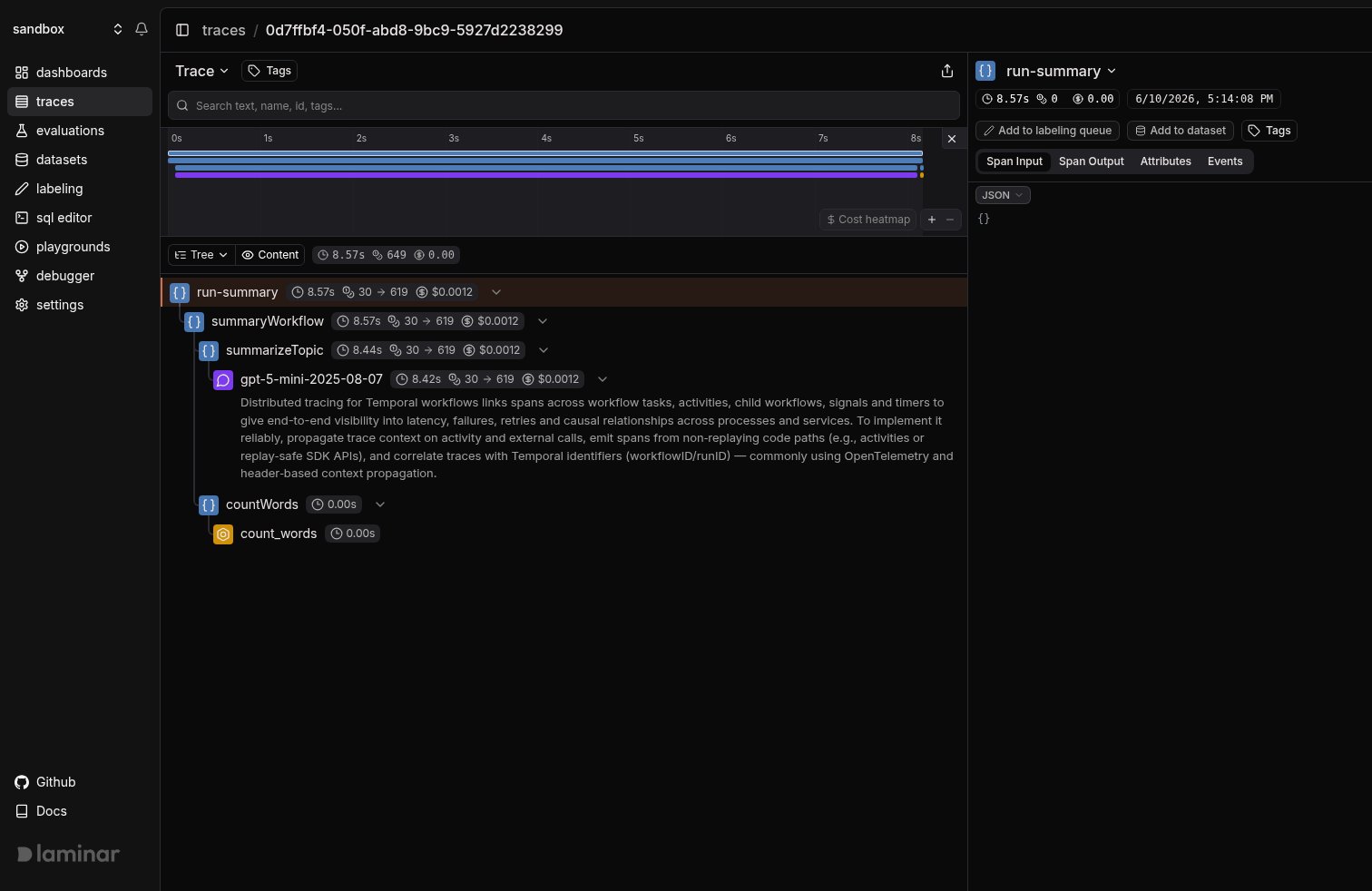
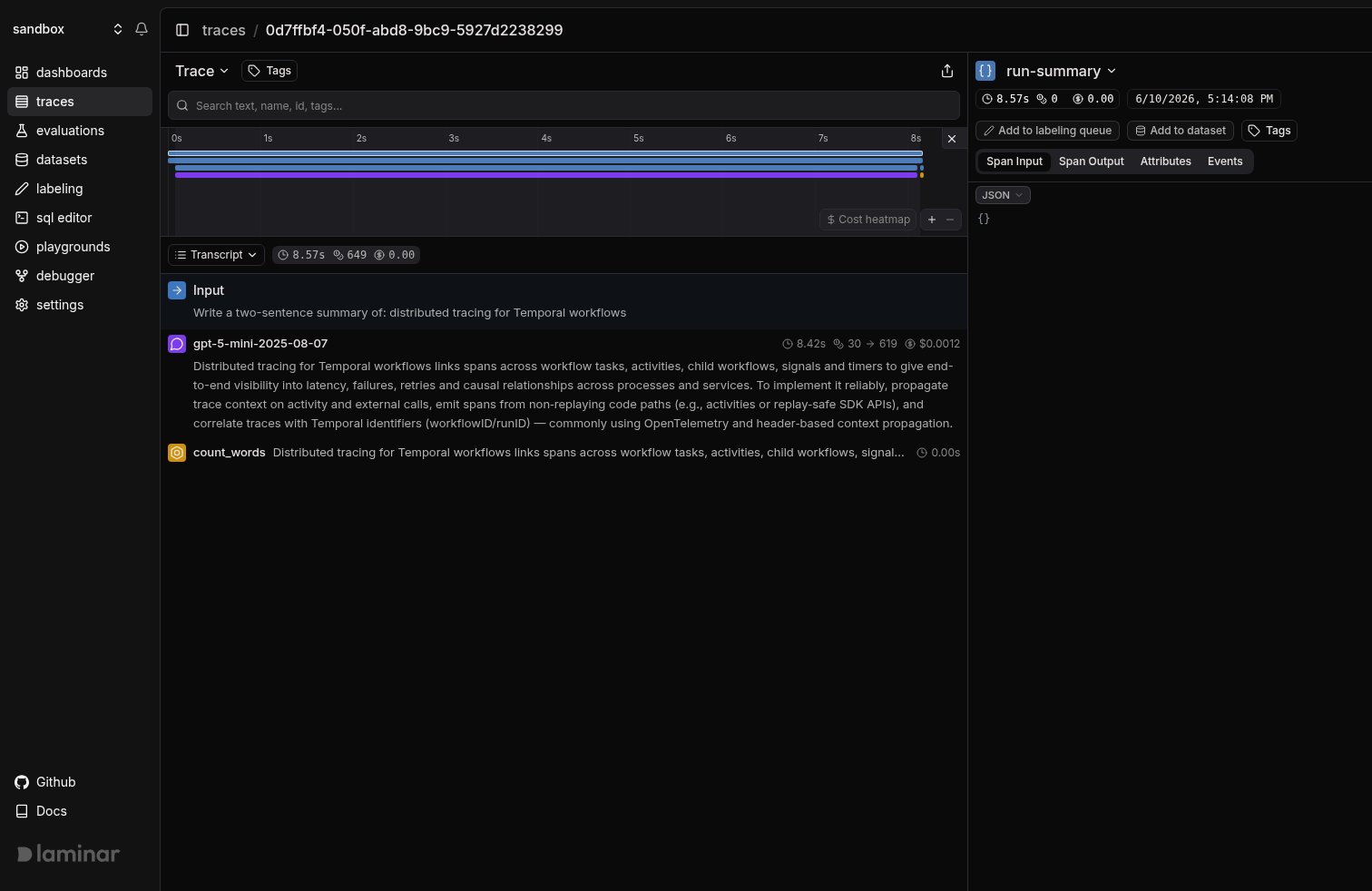 Production workflows rarely run two neat activities back to back. They fan out across many activities, child workflows, and signals, each in its own process, and a naive setup scatters them into a pile of disconnected traces you have to correlate by hand. Laminar does that correlation for you: it propagates the trace context through Temporal headers so the client-side `run-summary` root, the workflow lifecycle span, every activity, and the LLM and tool spans inside them all land in **one trace, out of the box**, no matter how disjoint the activities are. The tree view below just makes that single stitched-together hierarchy easy to read.
 More on the trace UX: [Viewing traces](/platform/viewing-traces).
## Control what activity spans record (TypeScript)
In TypeScript, `ActivityInterceptorFactory` accepts three options, all defaulting to `true`:
```typescript theme={null}
interceptors: {
activity: [
LaminarTemporalInterceptors.ActivityInterceptorFactory({
createActivitySpan: true,
recordActivityArgs: true,
recordActivityOutput: true,
}),
],
}
```
* `createActivitySpan`: wrap each activity execution in a span named after the activity type. Set to `false` to only restore the trace context (so your own `observe()` calls inside the activity act as roots) without an extra wrapper span.
* `recordActivityArgs`: record the activity's arguments as the span input. Set to `false` to omit large or sensitive arguments.
* `recordActivityOutput`: record the activity's return value as the span output. Set to `false` to omit large or sensitive results.
`recordActivityArgs` and `recordActivityOutput` are ignored when `createActivitySpan` is `false`.
The three client interceptors map to Temporal's three client surfaces:
* `WorkflowClientInterceptor`: injects trace context on workflow start, signal, query, update, terminate, and describe calls.
* `ActivityClientInterceptor`: injects trace context on standalone activity client calls. Standalone activities are experimental in Temporal, so this interceptor is best-effort.
* `ScheduleClientInterceptor`: registered but a deliberate no-op. A Schedule is a long-lived server-side object whose stored workflow-start action replays on every triggered run, so injecting the active span at creation time would pin every future run to one long-dead trace. Each triggered run starts its own root trace instead.
## Keep the workflow interceptor in your own file (TypeScript)
The `require.resolve('@lmnr-ai/lmnr/temporal-workflow-interceptors')` path works for most setups. Two cases call for vendoring the interceptor in your own repository and passing a relative path:
* Your bundler or monorepo layout cannot resolve the package entry point inside the workflow bundle.
* You build workflows with a pre-built bundle via `bundleWorkflowCode` (see the note below).
Copy the file below into your project (for example `src/laminar-workflow-interceptors.ts`) and reference it the same way: `require.resolve('./laminar-workflow-interceptors')`.
```typescript laminar-workflow-interceptors.ts theme={null}
import {
AsyncLocalStorage,
type Headers,
type WorkflowInterceptors,
} from '@temporalio/workflow';
const LAMINAR_SPAN_CONTEXT_HEADER = 'x-lmnr-span-context';
const TRACEPARENT_HEADER = 'traceparent';
const hasTraceHeaders = (headers: Headers): boolean =>
headers[LAMINAR_SPAN_CONTEXT_HEADER] != null ||
headers[TRACEPARENT_HEADER] != null;
let _startHeaders: Headers = {};
const _handlerHeaders = new AsyncLocalStorage();
const activeHeaders = (): Headers =>
_handlerHeaders.getStore() ?? _startHeaders;
export const interceptors = (): WorkflowInterceptors => ({
inbound: [
{
execute: async (input, next) => {
_startHeaders = input.headers ?? {};
return next(input);
},
handleSignal: async (input, next) => {
const headers = input.headers ?? {};
return hasTraceHeaders(headers)
? _handlerHeaders.run(headers, () => next(input))
: next(input);
},
handleUpdate: async (input, next) => {
const headers = input.headers ?? {};
return hasTraceHeaders(headers)
? _handlerHeaders.run(headers, () => next(input))
: next(input);
},
},
],
outbound: [
{
scheduleActivity: async (input, next) =>
next({ ...input, headers: { ...activeHeaders(), ...input.headers } }),
scheduleLocalActivity: async (input, next) =>
next({ ...input, headers: { ...activeHeaders(), ...input.headers } }),
startChildWorkflowExecution: async (input, next) =>
next({ ...input, headers: { ...activeHeaders(), ...input.headers } }),
continueAsNew: async (input, next) =>
next({ ...input, headers: { ...activeHeaders(), ...input.headers } }),
},
],
});
```
If you create the worker with a pre-built `workflowBundle`, Temporal ignores `interceptors.workflowModules`, because the bundle is already compiled. Register the interceptor at bundle time instead:
```typescript theme={null}
await bundleWorkflowCode({
workflowsPath: require.resolve('./workflows'),
workflowInterceptorModules: [
require.resolve('@lmnr-ai/lmnr/temporal-workflow-interceptors'),
],
});
```
## Track outcomes with Signals
Traces answer *what happened on this run*. **[Signals](/signals/introduction) answer the cross-trace question**: *how often does an activity retry before succeeding, which workflows exceed their timeout, when does the model return an empty summary*. A Signal pairs a plain-language prompt with a JSON output schema. Laminar runs it live on new traces (Triggers) or backfills it across history (Jobs) and records a structured event every time it matches. From there you [query](/platform/sql-editor), [cluster](/signals/clusters), and [alert](/signals/alerts) on events across every trace.
Every new project ships with a **Failure Detector** Signal that categorizes issues on any trace over 1000 tokens. Open it from the Signals sidebar to see events as soon as your workflow traces arrive.
## Query across traces
* **[SQL editor](/platform/sql-editor)** for ad-hoc queries across traces, spans, signals, and evals.
* **SQL API** for programmatic access from scripts and pipelines.
* **[CLI](/platform/cli)** (`lmnr-cli sql query`) for terminal-driven queries and piping JSON into shell tools or coding agents.
* **[MCP server](/platform/mcp)** to query Laminar directly from Claude Code, Cursor, Codex, or any MCP-aware client.
## Troubleshooting
* Confirm `LMNR_PROJECT_API_KEY` is set in both the client and the worker process.
* **Python**: both processes must call `Laminar.initialize()` before the `Client` connects, and `temporalio` must be importable at that point so the auto-instrumentation engages.
* **TypeScript**: both processes must call `Laminar.initialize()`. The client needs `instrumentModules: { temporal: { client } }`; the worker needs `disableBatch: true`.
* **Python**: make sure `Laminar.initialize()` runs before `Client.connect()` in both processes. The interceptor that propagates context is injected at `Client` construction, so initializing afterward misses it.
* **TypeScript**: the client must register `WorkflowClientInterceptor` and pass the `@temporalio/client` module via `instrumentModules: { temporal: { client } }`. The module is what wraps the run in the parent span; the interceptor injects that span into headers. The worker must register the workflow interceptor module via `interceptors.workflowModules`. If it is missing, the workflow starts but never forwards its context to the activities it schedules.
* **Python**: confirm `Laminar.initialize(disable_batch=True)` runs in the worker process before the worker connects. Without `disable_batch=True`, short-lived activity executions can exit before the batching span processor flushes their spans.
* **TypeScript**: register `ActivityInterceptorFactory()` under `interceptors.activity` in `Worker.create`, and set `disableBatch: true` in the worker. Short-lived activity executions can exit before a batched span processor flushes their spans. If you set `createActivitySpan: false`, activities only restore context and rely on your own `observe()` spans to appear.
You are creating a span inside a workflow function (`Laminar.start_as_current_span()` / `Laminar.start_span()` in Python, `observe()` / `Laminar.startSpan()` in TypeScript). Workflow code runs in Temporal's deterministic sandbox and cannot create spans. Move instrumentation into activities (normal functions) or onto the client.
Set the base URL and the ports of your instance when initializing. For a local OSS deployment:
```typescript theme={null}
Laminar.initialize({
baseUrl: 'http://localhost',
httpPort: 8000,
grpcPort: 8001,
disableBatch: true,
});
```
```python theme={null}
Laminar.initialize(
base_url="http://localhost",
http_port=8000,
grpc_port=8001,
disable_batch=True,
)
```
## What's next
Read the transcript view, filter, and search across traces.
Detect behaviors and failures across every run, then query, cluster, and alert on them.
Query traces programmatically from the UI, API, or your IDE.
Mark functions as TOOL or LLM spans so they surface in the transcript view.
More on the trace UX: [Viewing traces](/platform/viewing-traces).
## Control what activity spans record (TypeScript)
In TypeScript, `ActivityInterceptorFactory` accepts three options, all defaulting to `true`:
```typescript theme={null}
interceptors: {
activity: [
LaminarTemporalInterceptors.ActivityInterceptorFactory({
createActivitySpan: true,
recordActivityArgs: true,
recordActivityOutput: true,
}),
],
}
```
* `createActivitySpan`: wrap each activity execution in a span named after the activity type. Set to `false` to only restore the trace context (so your own `observe()` calls inside the activity act as roots) without an extra wrapper span.
* `recordActivityArgs`: record the activity's arguments as the span input. Set to `false` to omit large or sensitive arguments.
* `recordActivityOutput`: record the activity's return value as the span output. Set to `false` to omit large or sensitive results.
`recordActivityArgs` and `recordActivityOutput` are ignored when `createActivitySpan` is `false`.
The three client interceptors map to Temporal's three client surfaces:
* `WorkflowClientInterceptor`: injects trace context on workflow start, signal, query, update, terminate, and describe calls.
* `ActivityClientInterceptor`: injects trace context on standalone activity client calls. Standalone activities are experimental in Temporal, so this interceptor is best-effort.
* `ScheduleClientInterceptor`: registered but a deliberate no-op. A Schedule is a long-lived server-side object whose stored workflow-start action replays on every triggered run, so injecting the active span at creation time would pin every future run to one long-dead trace. Each triggered run starts its own root trace instead.
## Keep the workflow interceptor in your own file (TypeScript)
The `require.resolve('@lmnr-ai/lmnr/temporal-workflow-interceptors')` path works for most setups. Two cases call for vendoring the interceptor in your own repository and passing a relative path:
* Your bundler or monorepo layout cannot resolve the package entry point inside the workflow bundle.
* You build workflows with a pre-built bundle via `bundleWorkflowCode` (see the note below).
Copy the file below into your project (for example `src/laminar-workflow-interceptors.ts`) and reference it the same way: `require.resolve('./laminar-workflow-interceptors')`.
```typescript laminar-workflow-interceptors.ts theme={null}
import {
AsyncLocalStorage,
type Headers,
type WorkflowInterceptors,
} from '@temporalio/workflow';
const LAMINAR_SPAN_CONTEXT_HEADER = 'x-lmnr-span-context';
const TRACEPARENT_HEADER = 'traceparent';
const hasTraceHeaders = (headers: Headers): boolean =>
headers[LAMINAR_SPAN_CONTEXT_HEADER] != null ||
headers[TRACEPARENT_HEADER] != null;
let _startHeaders: Headers = {};
const _handlerHeaders = new AsyncLocalStorage();
const activeHeaders = (): Headers =>
_handlerHeaders.getStore() ?? _startHeaders;
export const interceptors = (): WorkflowInterceptors => ({
inbound: [
{
execute: async (input, next) => {
_startHeaders = input.headers ?? {};
return next(input);
},
handleSignal: async (input, next) => {
const headers = input.headers ?? {};
return hasTraceHeaders(headers)
? _handlerHeaders.run(headers, () => next(input))
: next(input);
},
handleUpdate: async (input, next) => {
const headers = input.headers ?? {};
return hasTraceHeaders(headers)
? _handlerHeaders.run(headers, () => next(input))
: next(input);
},
},
],
outbound: [
{
scheduleActivity: async (input, next) =>
next({ ...input, headers: { ...activeHeaders(), ...input.headers } }),
scheduleLocalActivity: async (input, next) =>
next({ ...input, headers: { ...activeHeaders(), ...input.headers } }),
startChildWorkflowExecution: async (input, next) =>
next({ ...input, headers: { ...activeHeaders(), ...input.headers } }),
continueAsNew: async (input, next) =>
next({ ...input, headers: { ...activeHeaders(), ...input.headers } }),
},
],
});
```
If you create the worker with a pre-built `workflowBundle`, Temporal ignores `interceptors.workflowModules`, because the bundle is already compiled. Register the interceptor at bundle time instead:
```typescript theme={null}
await bundleWorkflowCode({
workflowsPath: require.resolve('./workflows'),
workflowInterceptorModules: [
require.resolve('@lmnr-ai/lmnr/temporal-workflow-interceptors'),
],
});
```
## Track outcomes with Signals
Traces answer *what happened on this run*. **[Signals](/signals/introduction) answer the cross-trace question**: *how often does an activity retry before succeeding, which workflows exceed their timeout, when does the model return an empty summary*. A Signal pairs a plain-language prompt with a JSON output schema. Laminar runs it live on new traces (Triggers) or backfills it across history (Jobs) and records a structured event every time it matches. From there you [query](/platform/sql-editor), [cluster](/signals/clusters), and [alert](/signals/alerts) on events across every trace.
Every new project ships with a **Failure Detector** Signal that categorizes issues on any trace over 1000 tokens. Open it from the Signals sidebar to see events as soon as your workflow traces arrive.
## Query across traces
* **[SQL editor](/platform/sql-editor)** for ad-hoc queries across traces, spans, signals, and evals.
* **SQL API** for programmatic access from scripts and pipelines.
* **[CLI](/platform/cli)** (`lmnr-cli sql query`) for terminal-driven queries and piping JSON into shell tools or coding agents.
* **[MCP server](/platform/mcp)** to query Laminar directly from Claude Code, Cursor, Codex, or any MCP-aware client.
## Troubleshooting
* Confirm `LMNR_PROJECT_API_KEY` is set in both the client and the worker process.
* **Python**: both processes must call `Laminar.initialize()` before the `Client` connects, and `temporalio` must be importable at that point so the auto-instrumentation engages.
* **TypeScript**: both processes must call `Laminar.initialize()`. The client needs `instrumentModules: { temporal: { client } }`; the worker needs `disableBatch: true`.
* **Python**: make sure `Laminar.initialize()` runs before `Client.connect()` in both processes. The interceptor that propagates context is injected at `Client` construction, so initializing afterward misses it.
* **TypeScript**: the client must register `WorkflowClientInterceptor` and pass the `@temporalio/client` module via `instrumentModules: { temporal: { client } }`. The module is what wraps the run in the parent span; the interceptor injects that span into headers. The worker must register the workflow interceptor module via `interceptors.workflowModules`. If it is missing, the workflow starts but never forwards its context to the activities it schedules.
* **Python**: confirm `Laminar.initialize(disable_batch=True)` runs in the worker process before the worker connects. Without `disable_batch=True`, short-lived activity executions can exit before the batching span processor flushes their spans.
* **TypeScript**: register `ActivityInterceptorFactory()` under `interceptors.activity` in `Worker.create`, and set `disableBatch: true` in the worker. Short-lived activity executions can exit before a batched span processor flushes their spans. If you set `createActivitySpan: false`, activities only restore context and rely on your own `observe()` spans to appear.
You are creating a span inside a workflow function (`Laminar.start_as_current_span()` / `Laminar.start_span()` in Python, `observe()` / `Laminar.startSpan()` in TypeScript). Workflow code runs in Temporal's deterministic sandbox and cannot create spans. Move instrumentation into activities (normal functions) or onto the client.
Set the base URL and the ports of your instance when initializing. For a local OSS deployment:
```typescript theme={null}
Laminar.initialize({
baseUrl: 'http://localhost',
httpPort: 8000,
grpcPort: 8001,
disableBatch: true,
});
```
```python theme={null}
Laminar.initialize(
base_url="http://localhost",
http_port=8000,
grpc_port=8001,
disable_batch=True,
)
```
## What's next
Read the transcript view, filter, and search across traces.
Detect behaviors and failures across every run, then query, cluster, and alert on them.
Query traces programmatically from the UI, API, or your IDE.
Mark functions as TOOL or LLM spans so they surface in the transcript view.